
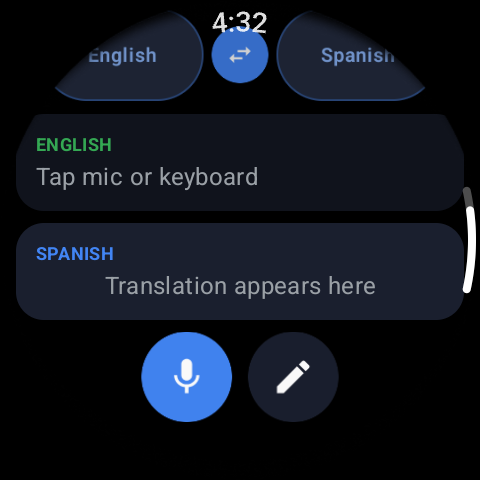
Install Translate for Wear OS from Google Play — it installs on the watch, not just the phone, and does the translating there. Open it on your wrist, pick the two languages (yours and the one you need), and you're ready. Because everything runs on the watch, you don't tether to your phone or hold anything up mid-conversation.
How to translate languages on your Wear OS smartwatch
The moment you need a translation is rarely the moment to pull out your phone, unlock it, open an app and hold it up to a stranger's face. Your watch is already on your wrist and already listening for your voice. Here's how to turn it into a pocket-free interpreter.
01Get it running on the watch
02Speak, or type, then listen
Tap the microphone and say a phrase; the watch converts your speech to text, translates it, and can read it out loud in the other language so the other person simply hears it. No signal, or a noisy place? Type instead — the same translation and spoken output work either way. Large tap targets and rotary-crown scrolling make it usable without squinting at a small screen.
03Getting cleaner translations
A watch mic is close to your mouth, which helps — but a few habits sharpen results:
- Speak one full sentence, not a trailing stream — short complete thoughts translate best
- Cut a noisy background where you can; a quick move away from a fan or crowd helps the speech-to-text
- Name places and numbers clearly — those are what get misheard
- If a word lands wrong, rephrase rather than repeat; a simpler sentence usually fixes it
04Reuse what you already translated
Every phrase is saved to history, which quietly becomes your phrasebook: the taxi address, the food allergy, the checkout question you keep needing. Scroll back and replay a saved line instead of re-speaking it — faster, and it says exactly what worked last time.